What is the best Opus Clip shorts workflow? Write the long form video so it already contains standalone segments, then let Opus Clip find them. Opus Clip meters processing by the minute of source footage rather than by the clip, so a rambling ninety minute recording costs four times what a tight twenty minute one does and returns worse clips. The Opus Clip shorts workflow below moves the expensive decisions upstream into the script, where they cost nothing.
Almost every guide to clipping tools is a review of the clipper. That is the wrong end of the problem. The clipper is a search function, and a search function is limited by what is in the thing it searches.
This is the practical version: what to change before the upload, what to pay for, and where the handoff genuinely fails.
Why the Opus Clip shorts workflow starts before you press record
Opus Clip ranks its output with a Virality Score. Its own documentation says the score runs from 0 to 99 and that the AI weighs four things: Hook, Flow, Value and Trend. It is available on the Starter and Pro plans, not on Free.
Read that list again as a creator rather than as a buyer. Hook and Flow are not properties of a clipping tool. They are properties of the recording. A hook exists because somebody wrote one. Flow exists because the segment resolves without depending on the fourteen minutes before it.
So the ceiling on your clips is set before the file is uploaded. The clipper can only find the best forty seconds that exist. If the best forty seconds in your video are a mid sentence tangent, that is what you get back, scored 71, with captions on it.
That is the single idea this opus clip shorts workflow is built around.
What Opus Clip actually charges you for
Opus Clip's pricing page lists Free at $0, Starter at $15 a month, Pro at $29 a month, and a custom Business tier. Free renders up to 1080p, keeps clips for three days, and watermarks the animated caption templates. Starter and Pro export without a watermark.
The part that changes how you work is the meter. Processing is billed against the length of the source video you upload, not the number of clips it returns. Ten clips from a sixty minute podcast and two clips from the same file cost the same. Confirm the current allowance on the pricing page before you commit, because these numbers move.
That single fact reverses the intuition most people bring to a clipping tool. You are not paying for output. You are paying for input. Feeding it everything is the expensive habit.
| Job | Opus Clip | Creator AI |
|---|---|---|
| Finding clip candidates in existing footage | Yes, this is the product | No |
| Reframing horizontal to vertical with tracking | Yes | No |
| Burned in animated captions on the clip | Yes | No |
| Scoring a clip for likely engagement | Yes, Virality Score | No |
| Writing the long form so clips exist | No | Yes, script and story builder |
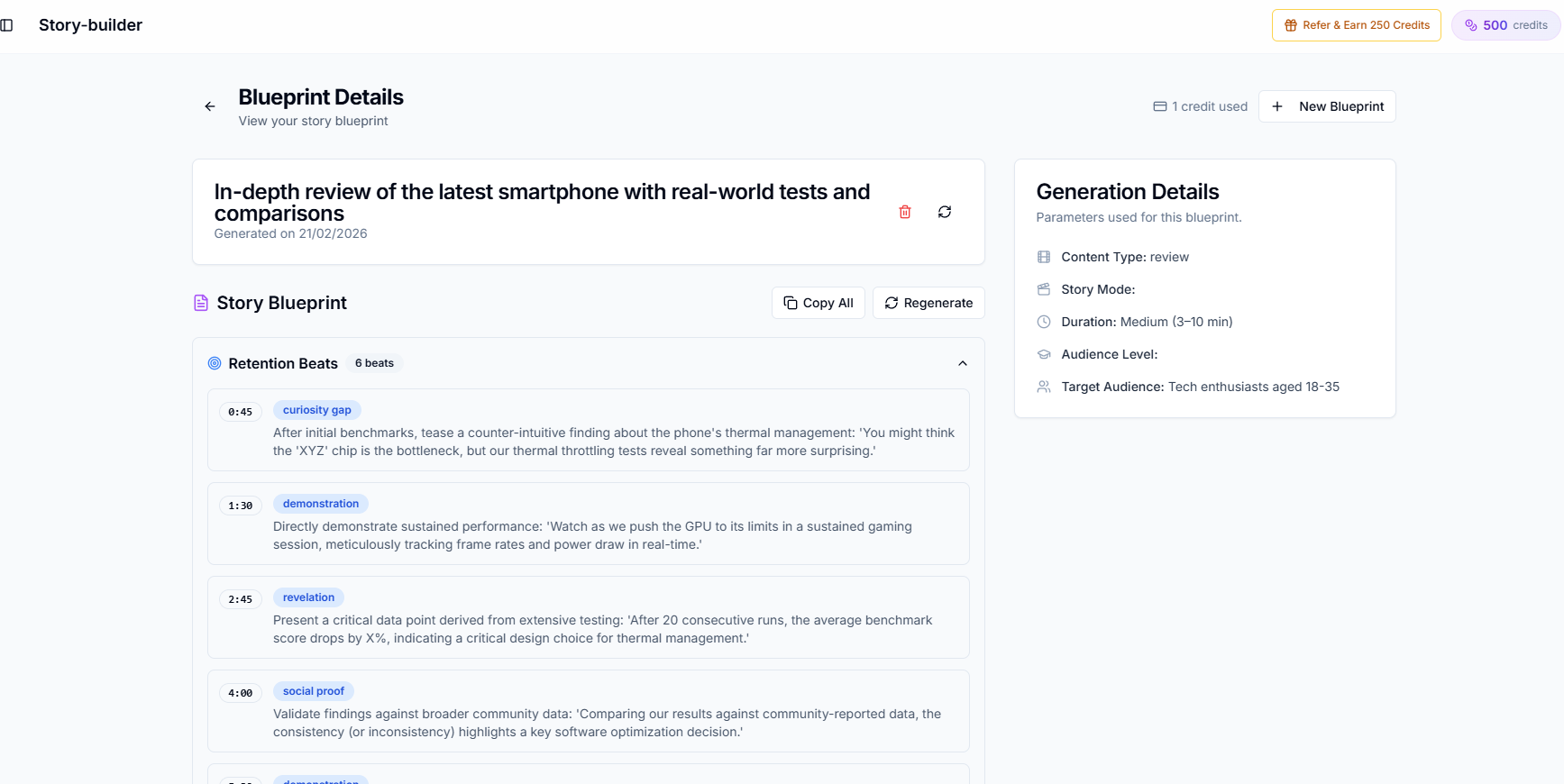
| Structuring for retention before filming | No | Yes, with a retention score |
| Subtitle file for the long form upload | No | Yes, SRT you can correct |
| Dubbing the finished video or clip | No | Yes, 94 languages |
Neither column is a replacement for the other. The overlap is genuinely zero, which is rare enough to be worth saying plainly.
The seven step Opus Clip shorts workflow
Step 1: Design the long form to have seams
Open the story builder and outline the video as three or four segments that each survive on their own. Each one gets a micro hook in its first sentence and finishes its own thought. The retention score tells you where the outline sags before you have filmed anything.
This is the whole trick. A video built as one continuous argument has no clean cut points, and no clipper invents them.
Step 2: Write the script with the seams intact
Generate the script through your trained voice profile with timestamps on. Resist the transition sentences that make a video flow beautifully and make a clip incomprehensible. "As I said earlier" is a phrase that costs you a Short.
Step 3: Record and publish the long form first
The long form upload is the asset. YouTube's search and discovery documentation says videos are ranked on "How well the title, description, and video content match the viewer's search", plus engagement. The Shorts are distribution for something that already exists, not a replacement for it.
Caption the long form properly while you are here. Generate the subtitles, fix the names and jargon in the editor, and upload a corrected SRT rather than trusting automatic captions.
Step 4: Upload only the minutes worth clipping
Here is where the meter changes your behaviour. Do not hand Opus Clip a ninety minute stream and hope. Trim to the sections your outline already flagged as self contained, then upload that.
On a sixty minute recording where twenty minutes are genuinely clippable, this is a two thirds saving on every pass, every month, forever. It is also the step almost nobody does, because uploading the whole file feels like getting more for the money.
Step 5: Sort by Virality Score, then overrule it
Opus Clip sorts results by score. Treat that as a first pass filter, not a verdict. The score cannot know that clip four gives away the answer your long form video is built to withhold, or that clip seven is a client's name pronounced wrong.
Watch the top eight, keep three, delete the rest. Keeping everything is how a channel ends up with forty Shorts and no identity.
Step 6: Give every Short its own title and description
A Short is a video, and YouTube treats it like one. Google's Shorts documentation confirms Shorts run up to 3 minutes and surface in search results, on the home feed, on your channel page and in subscription feeds, not only in the Shorts tab.
So the clip that inherits "Podcast Ep 42 Clip 3" as a title is throwing away the one field the ranking system reads directly. Write the title for the search the clip answers. Put the link to the long form video in the description.
Skip the tag box. The same YouTube page says tags are "Not important" and exist mainly to catch spelling mistakes.
Step 7: Dub the three that worked
This is the step that makes the arithmetic pleasant. The free plan caps a dub at 60 seconds of source, which is a real constraint on a twelve minute video and almost none at all on a Short.
Take the clip that outperformed, dub it into a second language, and upload it as its own Short on the same channel. You are testing an audience for the cost of one clip rather than one full video. Which languages are worth the effort is answered with numbers in the dubbing ROI breakdown.
The credit math nobody does before subscribing
Take a creator publishing one 45 minute podcast a week.
Uploading the full episode every week is 180 minutes of source a month. Uploading only the 15 minutes the outline marked as clippable is 60 minutes of source a month. Same number of usable Shorts, because the discarded 30 minutes per episode were never going to produce one.
That is a plan tier of difference, bought by spending twenty minutes on an outline you should have written anyway. Every clipping tool prices this way, which is why this part of the opus clip shorts workflow transfers even if you switch tools later.
Where Opus Clip is better left alone
Do not over apply the handoff. Several things here have no equivalent upstream:
- ReframeAnything, which keeps a moving subject centred when converting horizontal to vertical. Doing this by hand is miserable.
- Burned in animated captions, which are correct for a feed where nobody enables a caption track.
- ClipAnything, which searches footage by a plain language prompt, useful for gameplay and interviews where the interesting moment is visual rather than spoken.
- Publishing to several platforms in one pass, which is a real time saving and not a feature worth rebuilding.
Where this Opus Clip shorts workflow breaks
Interviews and podcasts you do not control. If a guest rambles, no amount of upstream planning saves you. Steps 4 through 7 still apply, step 1 does not.
Captions burned into a rendered clip. Once a clip is rendered, a wrong name is fixed by re editing and re rendering, not by editing text. Say the difficult words clearly on the day, or accept the re render.
Clips that need a hook the recording never had. A clipper cannot write. If every candidate opens weakly, the problem is upstream and the credits you spend looking are wasted twice.
Volume as a strategy. Shorts viewers convert to long form subscribers slowly. Three good clips a week beats twenty, and the opus clip shorts workflow is designed to produce three.
The short version
Opus Clip is a very good search function pointed at your footage. Search functions do not create the thing they find.
Write the long form so it contains three self contained segments, upload only those minutes, keep three clips, title each one for a real search, and dub the winner. That is the entire opus clip shorts workflow, and the expensive half of it happens in a text editor before anything is filmed. Start free and build the outline first.
Keep Reading
- The Best AI Tools to Turn Long Videos Into Shorts
- YouTube Shorts Script Generator: Hooks That Stop the Scroll
- YouTube Video Story Structure for Retention
- Creator AI + CapCut: From AI Script to Subtitled, Dubbed Video
- Outline it, film it, clip it. Start free or see plans.